We sincerely regret any inconvenience this may have caused. Please allow us some time to review your concern thoroughly and work towards a resolution. We truly appreciate your patience and will get back to you with an update at the earliest.
Just a quick note to let you know that the Niyo community is more than a place to get help with your queries. You can stay up-to-date with all the latest announcements from Niyo, and chat about anything Niyo or travel-related—whether it’s your Niyo card, Niyo services, or any other travel topics.
Plus, it’s the perfect spot to connect with fellow travelers! You can ask for advice on travel itineraries, visa info, tips and tricks, flight bookings, and so much more.
And don’t forget to explore the Travel with Niyo category for even more travel content!
Hey @bhawin! We regret the inconvenience caused and understand your disappointment. We attempted to reach you multiple times over the phone but were unable to connect. We would like to inform you that we have forwarded the issue to the relevant team for resolution at the earliest. We’ll keep you updated on any further progress. We truly appreciate your patience and understanding in the meantime.
Hi @jagadeesh7 I am also facing the same issue on my motorola device. Please let us know how to fix. As this is the only source of payments for me. Also please let me know if I can load the cash to the card, through online.
I have also uninstalled and cleared the cache. Still the issue persists
I am also facing the same issue on my Pixel 10 Pro. I have been using it on the same device for the past 15 days, and suddenly it stopped working today.
We sincerely regret any inconvenience this may have caused. Please allow us some time to review your concern thoroughly and work towards a resolution. We truly appreciate your patience and will get back to you with an update at the earliest.
Just a quick note to let you know that the Niyo community is more than a place to get help with your queries. You can stay up-to-date with all the latest announcements from Niyo, and chat about anything Niyo or travel-related—whether it’s your Niyo card, Niyo services, or any other travel topics.
Plus, it’s the perfect spot to connect with fellow travelers! You can ask for advice on travel itineraries, visa info, tips and tricks, flight bookings, and so much more.
And don’t forget to explore the Travel with Niyo category for even more travel content!
We sincerely regret any inconvenience this may have caused. Please allow us some time to review your concern thoroughly and work towards a resolution. We truly appreciate your patience and will get back to you with an update at the earliest.
Just a quick note to let you know that the Niyo community is more than a place to get help with your queries. You can stay up-to-date with all the latest announcements from Niyo, and chat about anything Niyo or travel-related—whether it’s your Niyo card, Niyo services, or any other travel topics.
Plus, it’s the perfect spot to connect with fellow travelers! You can ask for advice on travel itineraries, visa info, tips and tricks, flight bookings, and so much more.
And don’t forget to explore the Travel with Niyo category for even more travel content!
I am writing to inform you that I am facing an issue while opening the Niyo Global app on my Android mobile phone. Whenever I try to open the app, a pop-up message appears stating “Unsupported Device”, and the app does not open further.
Please note that:
- My device is an Android smartphone
- The operating system is up to date
- The Niyo Global app is updated to the latest version from the Play Store
I kindly request you to look into this issue and guide me on how to resolve it.I will be happy to provide them.
Looking forward to your support and resolution at the earliest.
We sincerely regret any inconvenience this may have caused. Please allow us some time to review your concern thoroughly and work towards a resolution. We truly appreciate your patience and will get back to you with an update at the earliest.
Just a quick note to let you know that the Niyo community is more than a place to get help with your queries. You can stay up-to-date with all the latest announcements from Niyo, and chat about anything Niyo or travel-related—whether it’s your Niyo card, Niyo services, or any other travel topics.
Plus, it’s the perfect spot to connect with fellow travelers! You can ask for advice on travel itineraries, visa info, tips and tricks, flight bookings, and so much more.
And don’t forget to explore the Travel with Niyo category for even more travel content!
Thank you for your time over the call. As discussed, kindly share the screen recording of the error at global.escalation@goniyo.com from your registered email ID. After sending the email, you’ll receive a ticket number—please share the ticket number here for our reference. Once received, we’ll review it on priority and work towards resolving the issue at the earliest.
We sincerely regret any inconvenience this may have caused. Please allow us some time to review your concern thoroughly and work towards a resolution. We truly appreciate your patience and will get back to you with an update at the earliest.
Just a quick note to let you know that the Niyo community is more than a place to get help with your queries. You can stay up-to-date with all the latest announcements from Niyo, and chat about anything Niyo or travel-related—whether it’s your Niyo card, Niyo services, or any other travel topics.
Plus, it’s the perfect spot to connect with fellow travelers! You can ask for advice on travel itineraries, visa info, tips and tricks, flight bookings, and so much more.
And don’t forget to explore the Travel with Niyo category for even more travel content!
Thank you for your time over the call. As discussed, kindly share the screen recording of the error at global.escalation@goniyo.com from your registered email ID. After sending the email, you’ll receive a ticket number—please share the ticket number here for our reference. Once received, we’ll review it on priority and work towards resolving the issue at the earliest.
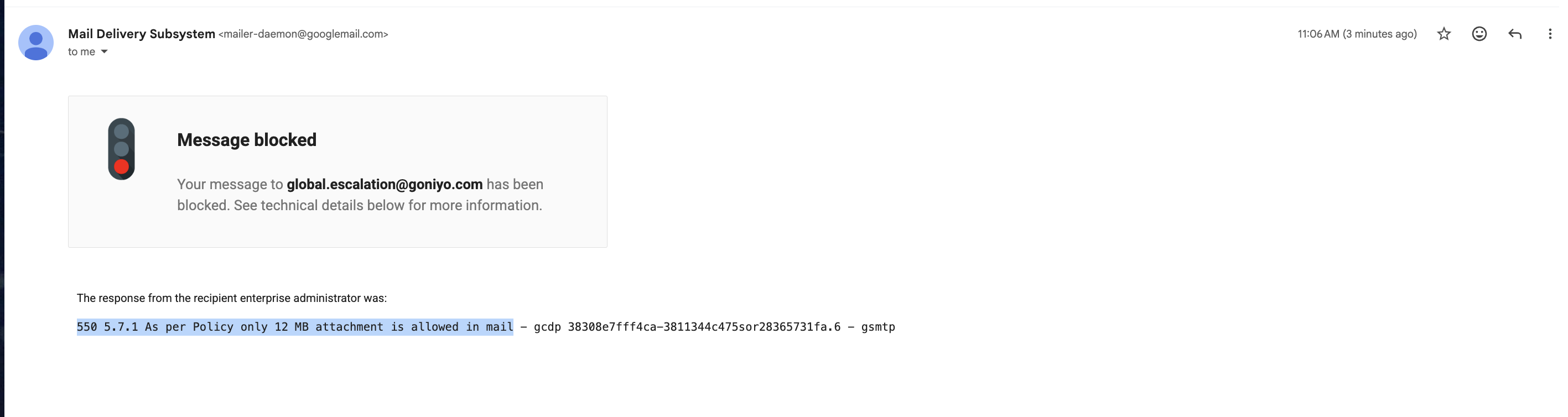
Thank you for sharing the screen recording with us. We’ve escalated the issue to the relevant team for a detailed review and will keep you updated as soon as we receive further information. We regret the difficulty you faced while attempting to share the recording via email and will look into that as well. We truly appreciate your patience and understanding.
We regret the inconvenience caused and understand your concern. We attempted to reach you over the phone but were unable to connect. Please be assured that the issue has been shared with the relevant team and is being reviewed on priority. We’ll keep you informed of any updates and appreciate your patience and understanding. Regarding funds transfer, you can load funds onto your Niyo savings account using UPI, NEFT, or IMPS from any Indian bank account.
We regret the inconvenience caused and understand your concern. We attempted to reach you over the phone but were unable to connect. Please be assured that the issue has been shared with the relevant team and is being reviewed on priority. We’ll keep you informed of any updates and appreciate your patience and understanding in the meantime.